Kapil Garg
 Unplanned time off and unclear leave communication are one of the most common causes of schedule disruption at work. Studies consistently show that poor planning and last-minute absences can reduce team productivity by 20–30%, especially in roles that depend on shared workloads and deadlines. This is why using clear time off request templates is not just a formality, but a practical way to keep work moving smoothly.
Whether you are requesting paid time off (PTO), planning a vacation, applying for sick leave, or asking for time off due to personal reasons, the way you communicate matters. A well-structured time off request email or PTO request form helps managers plan coverage, track availability, and maintain balanced schedules across teams. It also supports healthier work habits that align with proven time management strategies and long-term productivity goals.
In this guide, you’ll find free time off request templates designed for real workplace scenarios, including PTO requests, vacation leave, sick leave, emergency time off, and half-day or hourly requests. We also include downloadable Excel time off request forms, which are especially useful for teams that still rely on spreadsheets to manage attendance, approvals, and planning. When used consistently, these templates help teams reduce confusion, improve transparency, and support better employee productivity without adding extra administrative effort.
How to request time off from work (step by step)
Requesting time off becomes much easier when you follow a clear process. Whether you are submitting a time off request email, filling out a PTO request form, or using an internal system, these steps help ensure faster approvals and fewer misunderstandings.
1. Check your company’s time off policy
Before submitting a request, review your company’s time off and leave policy. This helps you understand eligibility, advance notice requirements, and whether your request qualifies as paid time off (PTO), vacation leave, sick leave, or unpaid leave. Clear policies also prevent confusion around special cases such as flexible schedules or shift-based work, which are increasingly common in modern workplaces.
Understanding policies early supports better planning and aligns with structured time management strategies that reduce last-minute disruptions.
2. Choose the right time off request method
Next, decide how you will submit your request. The method often depends on urgency, company culture, and approval workflows.
Common options include:
- A time off request email for standard requests
- A PTO request form for documented approvals
- A chat message for urgent or same-day requests
- A spreadsheet or Excel form for small teams managing schedules manually
Choosing the right format improves visibility and helps managers track availability more accurately, especially when combined with proper timekeeping and attendance tracking systems.
3. Clearly mention dates, duration, and coverage
Every effective time off request should clearly state:
- Start and end dates
- Full day, half-day, or hourly duration
- Any handover or coverage plan if required
Providing this information upfront helps managers plan workloads, redistribute tasks, and maintain team productivity. It also reduces back-and-forth communication and approval delays. Well-planned requests support healthier schedules and contribute to consistent employee productivity across teams.
4. Submit early and follow up professionally
Whenever possible, submit your time off request in advance. Early requests increase approval chances and give teams enough time to adjust schedules. If you do not receive a response, a polite follow-up keeps communication clear without sounding pushy.
Consistent and respectful communication builds trust and supports long-term collaboration, especially in teams managing multiple projects or remote schedules.
5. Wait for confirmation before finalizing plans
Always wait for formal approval before making non-refundable plans. Approved requests ensure accurate records, prevent scheduling conflicts, and keep attendance tracking up to date. This is particularly important for organizations that rely on structured approval flows or shared calendars.
What should a time off request include?
A good time off request should be clear, simple, and complete. Whether you are sending a time off request email or filling out a PTO request form, including the right details helps managers review and approve your request faster.
The table below shows the key elements every time off request should include and why they matter.
Time off request checklist
| What to include | Why it’s important |
| Employee name and role | Helps managers quickly identify who is requesting time off |
| Type of time off | Clarifies whether it is PTO, vacation, sick leave, or unpaid leave |
| Dates of time off | Allows managers to plan schedules and coverage |
| Duration | Shows whether the request is for a full day, half-day, or a few hours |
| Handover or coverage plan | Ensures work continues smoothly while you are away |
| Approval request | Confirms that formal approval is needed before plans are finalized |
Tip: Keeping your request short and clear increases the chances of faster approval and fewer follow-up questions.
Types of time off requests
Employees request time off for different reasons, and choosing the right type helps avoid confusion and delays. When the correct type of time off is clearly mentioned, managers can apply the right policy, plan schedules properly, and approve requests faster.
Paid Time Off (PTO)
Paid Time Off, or PTO, is used for planned leave that comes from an employee’s available PTO balance. These requests usually follow company rules and may require advance notice or balance checks before approval. PTO is commonly used for personal days, planned breaks, or extended time away from work.
Vacation leave
Vacation leave is requested for holidays, travel, or planned personal time. These requests are often submitted well in advance and may include a short handover note so work continues smoothly while the employee is away. Clear vacation requests help teams plan workloads without disruption.
Sick leave
Sick leave is used when an employee is unwell and unable to work. These requests are usually short and direct, especially when made on the same day. In most cases, employees are not expected to share detailed medical information when requesting sick leave.
Emergency leave
Emergency leave is requested for unexpected personal or family situations that require immediate time off. These requests are often urgent and focus on informing the manager quickly rather than providing full details upfront.
Half-day leave
Half-day leave is used when an employee needs only part of the workday off, such as the morning or afternoon. This type of request helps maintain partial availability while still allowing time away when needed.
Hourly time off
Hourly time off is requested when only a few hours are needed away from work, such as for appointments or personal errands. Clearly stating the hours helps managers adjust schedules and coverage easily.
Time off request templates
This section includes professional time off request templates that employees can use for different situations. Each template follows standard workplace communication practices and can be used as an email or Word document.
Template 1 – Simple & Professional Time Off Request
This template is designed for general use and works well for planned time off, personal leave, or standard absence requests. It follows a clear and professional format that managers can review and approve easily.
Why use the Simple Time Off Request template?
This template is ideal when you want to keep your request professional, clear, and respectful. It includes all essential details such as dates, type of leave, and work coverage, without sounding too formal or too casual.
How to use the Simple Time Off Request template?
Use this template as an email or Word document. Replace the placeholders with your details and submit it according to your company’s time off request process.
Download: Simple Time Off Request Template (Word)
Template 2 – Time Off Request Email Template
This template is suitable when you want a clearly documented email request that includes all necessary details for review and approval. It works well for planned leave, PTO requests, or situations where written confirmation is important.
Why use the Time Off Request Email template?
This template is useful when you need a structured and well-documented email. It clearly outlines the reason for the request, dates, duration, and coverage plan, making it easy for managers and HR teams to review and keep records.
How to use the Time Off Request Email template?
Use this template as an email or Word document. Update the placeholders with your details and send it according to your company’s time off request process.
Download: Time Off Request Email Template
Paid Time Off (PTO) request templates
Paid Time Off (PTO) requests usually follow specific company rules and approval processes. Unlike general time off requests, PTO requests often require employees to clearly mention the leave type, dates, and sometimes their available PTO balance. Using the right PTO request template helps managers review requests faster and ensures accurate record keeping.
These PTO request templates are designed for common workplace situations, including email-based requests and form-based submissions. They help employees communicate clearly while supporting managers and HR teams in tracking leave, approvals, and balances without confusion.
Below, you’ll find PTO request templates that work for both small teams and larger organizations, whether you are submitting a simple PTO email or filling out a structured request form.
Template 3 – PTO Request Email Template
This template is designed specifically for Paid Time Off (PTO) requests. It clearly mentions the PTO type, dates, and approval intent, which helps managers and HR teams track leave accurately.
Why use a PTO request email template?
A PTO request email template ensures your request follows company policy and includes all required details. It reduces delays by clearly stating the PTO type, duration, and work coverage, making approvals faster and easier.
How to write a PTO request email?
Use this format when requesting leave from your PTO balance. Replace the placeholders with your details and submit the request according to your company’s PTO policy.
Download: PTO Request Email Template
Template 4 – PTO Request Form Template (Excel)
This template is designed for teams that use Excel spreadsheets to collect, review, and approve Paid Time Off (PTO) requests. It provides a structured format that helps managers and HR teams track requests consistently and avoid missing information.
Why use a PTO request form template?
A PTO request form is useful when your organization needs a clear record of leave requests. It ensures all required details such as dates, duration, and approval status are captured in one place. This format is especially helpful for small teams, growing companies, or organizations that manage PTO manually.
How to use a PTO request form template?
Use this template in Excel. Employees can fill in their details, and managers or HR teams can review and approve the request directly in the same file. You can also store completed forms for future reference.
PTO Request Form – Excel Fields
Use the following fields in your Excel template:
- Employee Name
- Employee ID (optional)
- Job Title or Department
- Type of Leave (PTO)
- Start Date
- End Date
- Total PTO Days or Hours Requested
- Available PTO Balance (optional)
- Reason for Leave (optional)
- Handover or Coverage Notes
- Manager Name
- Approval Status (Approved / Rejected / Pending)
- Manager Comments
- Approval Date
Download: PTO Request Form Template (Excel)
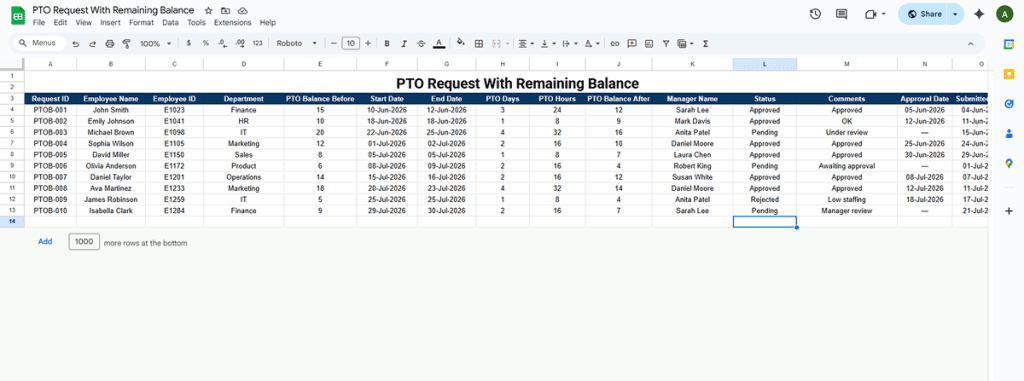
Template 5 – PTO Request With Remaining Balance (Excel)
This template is designed for teams that want clear visibility into PTO balances before and after a request. It helps employees understand how much PTO they will have left and allows managers and HR teams to approve requests with full context.
This format is especially useful for companies that manage PTO manually using Excel and want to avoid balance miscalculations or approval errors.
Why use a PTO request template with remaining balance?
Tracking remaining PTO balance is important to prevent overuse of leave and payroll issues. This template shows the PTO balance before the request, the number of days or hours requested, and the remaining balance after the request.
It helps:
- Employees request PTO responsibly
- Managers approve requests faster
- HR teams maintain accurate leave records
- Avoid disputes related to PTO balance
How to use the PTO request with balance template?
Use this template in Excel. Employees fill in their details, PTO dates, and current balance. The sheet automatically calculates the number of days, hours, and remaining PTO balance. Managers can then review and update the approval status directly in the same file.
This template works well for small teams, growing companies, and organizations without automated HR systems.
PTO Request With Remaining Balance – Excel Table Fields
The Excel sheet should include the following columns:
- Request ID
- Employee Name
- Employee ID
- Department
- PTO Balance Before
- PTO Start Date
- PTO End Date
- PTO Days Requested (auto-calculated)
- PTO Hours Requested (auto-calculated)
- PTO Balance After (auto-calculated)
- Manager Name
- Approval Status
- Manager Comments
- Approval Date
- Request Submitted Date