Work today is no longer limited to a single office, device, or location. Teams work from home, offices, client sites, and across different time zones. As work becomes more flexible, organizations need a better way to bring people, tools, and information together in one secure environment. This is where a digital workspace becomes essential.
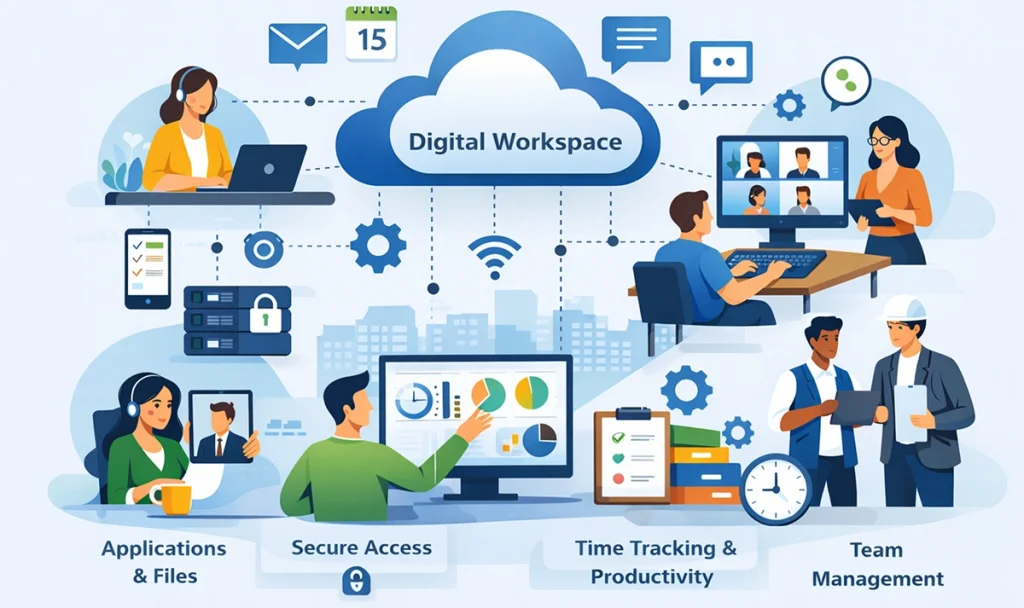
A digital workspace is a unified environment that gives employees access to all the tools, applications, files, and communication channels they need to do their jobs. Instead of switching between disconnected systems, users can work from one centralized workspace that is accessible from anywhere and on any device. For businesses, this means better productivity, stronger security, and improved visibility into how work gets done.
Many organizations adopt a digital workspace to support remote and hybrid teams, simplify IT management, and improve the overall employee experience. It also helps leaders understand how time, tools, and resources are being used across the organization, which is critical for making better business decisions.
In this guide, you will learn what a digital workspace is, how it works, and how it is different from a digital workplace. We will explore key components, real world use cases, benefits, challenges, and costs. You will also see how tools like time tracking and productivity platforms such as Clockdiary support a successful digital workspace strategy.
By the end, you will have a clear understanding of whether a digital workspace is the right fit for your organization and how to implement it effectively.
What Is a Digital Workspace?
A digital workspace is a centralized digital environment where employees can access everything they need to work from one place. It brings together applications, files, and communication tools so users do not have to switch between multiple systems.
The main goal of a digital workspace is to simplify how people work. Employees can sign in once and securely access approved tools and information based on their role. The experience remains consistent whether someone is working from an office, at home, or on the move.
A digital workspace typically includes:
Business applications required for daily work
Shared files and documents stored in secure systems
Communication tools for messaging and meetings
Controlled access based on user roles and permissions
This approach reduces friction in day to day work and helps employees stay focused. Instead of searching for information across different platforms, users can find what they need quickly within a single environment.
From an IT perspective, a digital workspace also improves visibility and control. Teams can manage access, apply security policies, and support users from one central system. This makes it easier to protect company data while supporting a flexible workforce.
In simple terms, a digital workspace is more than a collection of tools. It is an organized and secure environment designed to support modern ways of working by connecting people, technology, and information in one place.
Types of Digital Workspaces
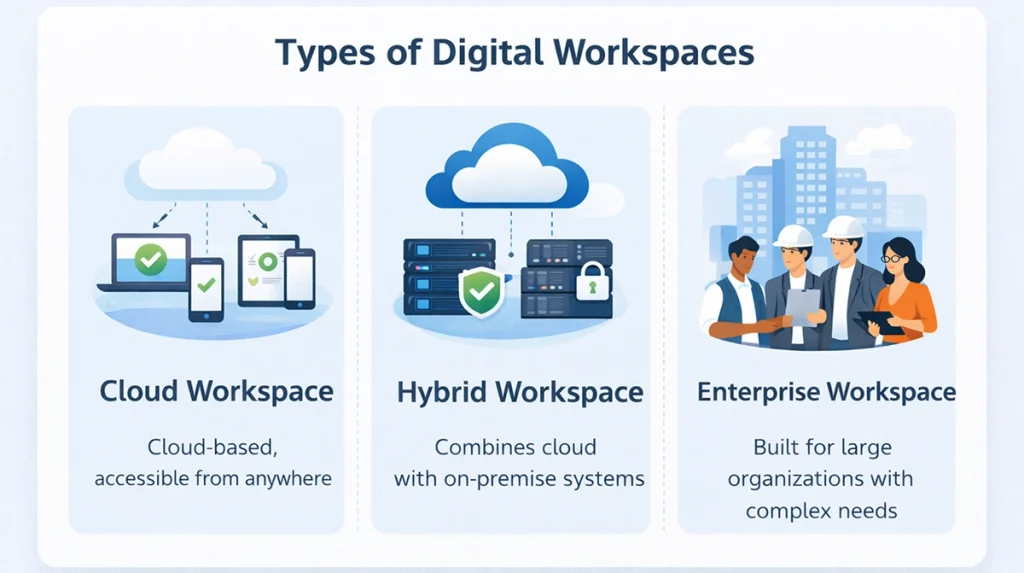
Digital workspaces are not the same for every organization. The structure and setup depend on how teams work, where they work from, and what level of control or flexibility is required. Most digital workspaces fall into a few common types, each designed to support different business needs.
Cloud Based Digital Workspace
A cloud based digital workspace is hosted on cloud infrastructure and accessed through the internet. Users can log in from any location and device without relying on local systems. This type is widely used by growing businesses because it is easy to scale, simple to manage, and quick to deploy. Updates, storage, and system maintenance are handled centrally, which reduces the workload for IT teams.
Hybrid Digital Workspace
A hybrid digital workspace combines cloud systems with on premise infrastructure. It is often used by organizations that need to keep certain data or applications within their own environment due to compliance or security requirements. At the same time, cloud tools are used for collaboration and flexibility. This approach allows businesses to modernize gradually while maintaining control over critical systems.
Enterprise Digital Workspace
An enterprise digital workspace is designed for large organizations with complex structures. It supports multiple teams, departments, and locations under one unified environment. Access is usually role based, and security controls are more advanced. Enterprise digital workspaces focus on stability, governance, and consistency while supporting thousands of users.
Smart Digital Workspace
A smart digital workspace uses data, automation, and intelligent systems to improve how people work. It can recommend tools, surface relevant information, and automate routine tasks. This type of workspace focuses on improving efficiency and reducing manual effort by learning from user behavior and usage patterns.
Role Based Digital Workspace
A role based digital workspace is customized around job functions. Employees see only the tools and information relevant to their role, such as HR, IT, finance, or sales. This reduces complexity and helps users stay focused. It also improves security by limiting access to only what is required for each role.
Each type of digital workspace serves a specific purpose. Many organizations use a combination of these models to create a workspace that fits their operational, security, and productivity needs.
Digital Workspace vs Digital Workplace
Although the terms digital workspace and digital workplace are often used together, they describe different parts of modern work. Understanding the difference helps organizations design better systems, assign clear ownership, and set realistic expectations for teams.
A digital workspace focuses on access. It ensures employees can securely reach the tools, applications, and files they need to perform their daily tasks. A digital workplace takes a broader view and looks at how people collaborate, communicate, and experience work using digital systems.
The table below highlights the key differences.
Aspect
Digital Workspace
Digital Workplace
Core focus
Access to work tools and systems
Overall employee work experience
Purpose
Help employees complete daily tasks efficiently
Improve collaboration and engagement
Scope
Applications, files, devices, and secure access
Tools, processes, communication, and ways of working
Ownership
Mainly managed by IT teams
Shared between IT, HR, leadership, and operations
Primary goal
Simple and secure access to work resources
Better teamwork and employee satisfaction
Technology role
Centralized and controlled environment
Technology combined with people and processes
Dependency
Can exist independently
Built on top of a digital workspace foundation
How They Work Together
A digital workspace acts as the technical foundation of modern work. It ensures that employees can access approved tools, data, and systems in a consistent and secure way, regardless of where they work from.
A digital workplace builds on this foundation by shaping how people interact, share information, and collaborate. It focuses on workflows, communication practices, and employee experience rather than just technology.
In simple terms, a digital workspace answers how employees access their work tools. A digital workplace explains how people work together using those tools. Organizations need both, but they should be planned separately to avoid confusion and gaps in responsibility.
Key Components of a Digital Workspace
A digital workspace is made up of several core components that work together to create a secure and consistent work environment. Each component plays a specific role in how employees access tools, collaborate with others, and complete their work. When these components are well integrated, the digital workspace becomes easier to manage and more effective for users.
Below are the key components that form a complete digital workspace.
Collaboration Layer (Communication and Meetings)
The collaboration layer supports day to day communication between employees. It includes tools for messaging, video meetings, and team discussions. This layer helps teams stay connected, share updates, and collaborate in real time, regardless of location. A strong collaboration setup reduces delays and keeps everyone aligned.
Document and Content Management
Document and content management systems store and organize files in a secure and structured way. Employees can create, share, and access documents without relying on local storage. Version control, access permissions, and search features help teams avoid confusion and keep information up to date.
Application Delivery (SaaS, VDI, and Virtualization)
Application delivery ensures employees can access the software they need to do their jobs. This may include cloud based applications, virtual desktops, or hosted systems. Centralized application access makes it easier for IT teams to manage updates and ensures users always work with approved tools.
Identity and Access Management (SSO and MFA)
Identity and access management controls who can access the digital workspace and what they can see. Single sign in allows users to log in once and access multiple systems. Multi factor authentication adds an extra layer of security. Together, these controls protect company data while keeping access simple for users.
Endpoint and Device Management (UEM and MDM)
Endpoint and device management tools help organizations manage laptops, mobile devices, and other endpoints. IT teams can enforce security policies, manage updates, and remotely support devices. This is especially important for remote and hybrid teams using different devices.
Cloud and Network Layer (Secure Connectivity)
The cloud and network layer connects users to applications and data securely. It manages network access, performance, and reliability. Secure connectivity ensures employees can work without interruptions while protecting systems from unauthorized access.
Analytics and Workspace Management
Analytics and workspace management tools provide insight into how the digital workspace is used. IT and business leaders can monitor performance, usage patterns, and potential issues. These insights help improve productivity, optimize resources, and support better decision making.
How Does a Digital Workspace Work?
A digital workspace works by connecting users, applications, and data through a single secure environment. Instead of accessing tools separately, employees log in once and get access to everything they need based on their role, device, and security rules.
At a basic level, a digital workspace controls three things: who the user is, what they can access, and how they access it.
Architecture Overview
The architecture of a digital workspace is designed to simplify access while maintaining security and control. It acts as a layer between employees and the systems they use every day.
A typical digital workspace works through the following steps:
The user signs in using a secure identity system
The system verifies identity and access permissions
Approved applications and files are made available
Device and security checks are applied before access is granted
Activity is monitored to ensure compliance and performance
The digital workspace does not replace existing tools. Instead, it brings them together so users can work without switching between platforms.
How Access and Security Are Managed
Access within a digital workspace is controlled through role based permissions. Employees only see the tools and information required for their job. This reduces risk and keeps the workspace simple to use.
Security is enforced through:
Identity verification before access
Device checks to ensure compliance
Secure connections between users and systems
Continuous monitoring of activity
This approach protects company data while allowing flexible work from different locations.
Role of AI and Automation in Digital Workspaces
AI and automation help digital workspaces run more efficiently and with less manual effort. They support both IT teams and employees by reducing repetitive tasks.
Together, structured architecture, security controls, and intelligent automation allow a digital workspace to adapt to changing work needs. This creates a stable and efficient environment that supports both employees and IT teams.
Benefits of a Digital Workspace
A digital workspace delivers value across the organization by improving how people access tools, collaborate, and manage work. The benefits are not limited to one team. IT teams gain better control, employees get a smoother work experience, and businesses see measurable improvements in productivity and efficiency.
To make this clear and easy to scan, the benefits are grouped by role.
Benefits for IT Teams
For IT teams, a digital workspace simplifies management while strengthening security. Instead of supporting disconnected systems, IT can manage access, devices, and applications from a central environment.
Key benefits for IT teams include:
Centralized management IT teams can manage users, applications, and access policies from one place. This reduces complexity and saves time on daily administration tasks.
Stronger security control Identity based access, device checks, and consistent security rules help protect company data. IT teams can enforce policies without blocking productivity.
Simplified onboarding and offboarding New users can be given access quickly based on their role. When employees leave, access can be removed immediately, reducing security risks.
Better visibility and monitoring Usage data and system activity provide insight into how tools are being used. This helps IT teams detect issues early and improve system performance.
Reduced support workload With fewer access issues and a more consistent user experience, help desk requests are reduced. This allows IT teams to focus on higher value initiatives.
Benefits for HR and Employees
A digital workspace improves the day to day experience of employees while supporting HR goals related to engagement, productivity, and flexibility.
Key benefits for HR and employees include:
Consistent work experience Employees access the same tools and information regardless of where they work. This consistency reduces frustration and helps people stay focused.
Faster access to tools and information Single sign in and centralized access reduce time spent searching for applications or files.
Improved collaboration Integrated communication and document sharing make it easier for teams to work together and stay aligned.
Support for remote and hybrid work Employees can work effectively from different locations without losing access or performance.
Clearer accountability When work tools and activities are centralized, it becomes easier to understand responsibilities and track progress.
For HR teams, these benefits support better onboarding, smoother transitions between roles, and improved employee satisfaction.
Business Benefits
At the business level, a digital workspace delivers measurable value by improving efficiency, reducing costs, and supporting better decision making.
Key business benefits include:
Higher productivity Employees spend less time switching between tools and more time focused on meaningful work.
Better use of technology investments Organizations gain clearer visibility into which tools are actually being used and which are not.
Improved operational efficiency Centralized systems reduce duplication of effort across teams and departments.
Stronger data security and compliance Consistent access controls and monitoring reduce the risk of data breaches and policy violations.
Scalability and flexibility Digital workspaces can grow with the organization, making it easier to add users, tools, or locations.
Data driven decision making Usage insights and productivity data help leaders make informed decisions about tools, resources, and workflows.
Digital Workspace Use Cases and Examples
Digital workspace use cases are most effective when they show measurable outcomes. Organizations adopt digital workspaces to solve specific operational problems and track improvements in productivity, access time, and efficiency.
Below are real world use cases with typical results organizations report after implementation.
Remote and Hybrid Work Teams
Remote teams often lose productivity due to scattered tools and access delays.
Problems commonly seen:
Employees spend excessive time switching between tools
New remote hires take longer to become productive
Managers lack visibility into daily work
What organizations typically see after using a digital workspace:
15 to 25 percent reduction in time spent accessing tools
Faster onboarding, often cutting setup time by several days
Improved accountability through centralized access and activity visibility
These improvements directly impact output and reduce friction for distributed teams.
IT Services and Software Development Teams
IT and development teams lose valuable time managing access and environments instead of building and supporting systems.
Problems commonly seen:
Manual access requests slow down projects
Security risks increase with unmanaged remote access
Tool sprawl increases operational overhead
What organizations typically see after using a digital workspace:
30 to 40 percent reduction in access related support requests
Faster environment setup for developers and IT staff
Stronger security compliance with fewer manual controls
This allows IT teams to focus on higher value work instead of routine access management.
HR, Operations, and Enterprise Teams
HR and operations teams handle sensitive data and repetitive processes that often rely on manual coordination.
Problems commonly seen:
Slow onboarding and offboarding
Inconsistent access to documents and systems
High administrative workload
What organizations typically see after using a digital workspace:
20 to 30 percent reduction in onboarding and offboarding time
Fewer access errors, improving compliance
Lower administrative effort, freeing time for strategic tasks
These gains improve employee experience while reducing operational risk.
Customer Support and Service Teams
Support teams depend on fast access to systems to meet service expectations.
Problems commonly seen:
Delays caused by login or access issues
Disconnected support tools
Inconsistent performance across shifts
What organizations typically see after using a digital workspace:
Faster response times, often improving first response by double digit percentages
Reduced downtime caused by access issues
More consistent service quality across locations and teams
This directly impacts customer satisfaction and retention.
Leadership and Management Teams
Leaders need reliable data to make timely decisions.
Problems commonly seen:
Delayed reporting
Lack of real time visibility
Decisions based on incomplete information
What organizations typically see after using a digital workspace:
Better visibility into tool usage and work patterns
Faster decision making using centralized dashboards
Improved alignment between teams and leadership
A digital workspace delivers measurable value when it is aligned with clear business goals. By tracking access time, productivity, and operational efficiency, organizations can clearly demonstrate the return on their digital workspace investment.
Common Challenges of Digital Workspace Implementation
A digital workspace can improve how teams work, but only when it is implemented carefully. Most challenges come from people, clarity, and structure rather than technology itself.
Below are the most common challenges organizations face and how they appear in real work situations.
1. Security and Data Privacy
As work becomes more flexible, organizations worry about how data is accessed and protected.
What users experience:
Unclear access rules
Use of personal devices for work
Confusion around safe tools
Why it matters: Without clear controls, flexibility can increase risk and reduce trust.
2. Low Adoption by Employees
A digital workspace only works if people actually use it.
What users experience:
Preference for old tools
Confusion about where work should happen
Feeling that the workspace adds extra steps
Why it matters: Low adoption reduces the value of the entire workspace.
3. Too Many Tools and Poor Organization
Instead of simplifying work, some workspaces add more tools than necessary.
What users experience:
Not knowing which tool to use
Switching between platforms too often
Slower daily work
Why it matters: Tool overload creates frustration and reduces productivity.
4. Performance and Access Issues
Slow or unreliable access quickly breaks confidence.
What users experience:
Delays when opening applications
Connection issues during meetings
Inconsistent performance across locations
Why it matters: Users stop trusting the workspace when access is unreliable.
5. Difficulty Showing Business Value
Many teams struggle to prove whether the digital workspace is working.
Why it matters: Without measurable outcomes, it is hard to justify investment or improvement.
Most digital workspace challenges are avoidable when organizations focus on simplicity, clarity, and user experience from the start.
Digital Workspace Cost, ROI, and Business Value
When organizations evaluate a digital workspace, the real question is not just cost. It is whether the investment saves time, improves productivity, and delivers measurable business value.
This section breaks it down in a way that is easy to understand and quick to scan.
1. What Drives the Cost of a Digital Workspace
Digital workspace costs usually fall into predictable areas.
Core cost components
Workspace and software licenses
Cloud infrastructure or hosting
Security and access management tools
Device and endpoint management
Ongoing cost factors
Initial setup and configuration
User training and onboarding
Ongoing administration and support
The total cost depends on the number of users, security requirements, and level of integration needed.
2. Where ROI Actually Comes From
Most organizations see ROI not from cutting tools, but from saving time and reducing friction.
Common ROI drivers
Faster access to work tools
Less time wasted switching between systems
Fewer access related IT tickets
Faster onboarding of new employees
Even small time savings per employee turn into large gains at scale.
3. How Organizations Measure ROI in Practice
ROI becomes visible when organizations track how work is done before and after implementation.
What teams typically measure
Time spent on productive work
Time lost due to access or tool issues
Changes in IT support volume
Adoption and usage of key tools
Time and productivity data help connect digital workspace usage to real outcomes.
4. Using Time Insights to Prove Business Value
Time tracking and productivity tools play a key role in showing value.
Tools like Clockdiary help turn daily activity into clear insights that support ROI discussions.
5. Business Value Beyond Numbers
Some benefits are harder to measure but still critical.
Long term business value
Better employee experience
Stronger security and compliance
Improved flexibility for growth
Better decision making with real data
When cost, time savings, and insight are viewed together, the value of a digital workspace becomes clear.
The Role of Time Tracking in a Digital Workspace
In modern work environments, simply having access to tools is not enough. Organizations also need visibility into how work is done. This visibility is not about monitoring people. It is about understanding where time goes and how work can be improved. This is where time tracking becomes important.
A digital workspace brings tools and access together. Time tracking shows what happens inside that workspace. It helps teams work with clarity instead of assumptions.
1. Why Time Visibility Matters for Remote and Hybrid Teams
Remote and hybrid work increases flexibility, but it also reduces natural visibility into daily work.
Common challenges without time visibility
No clear understanding of how time is spent
Unbalanced workloads across team members
Productivity discussions based on guesses
What time tracking provides
Clear data on tasks and application usage
Visibility into productive and non productive time
2. How Time Tracking Improves Productivity and Accountability
Once time is tracked, teams can improve how they work.
Ways time tracking supports productivity
Shows time spent in meetings versus focused work
Identifies repetitive tasks that slow teams down
Highlights tools that are rarely or heavily used
Business outcomes
Fewer unnecessary meetings
More time spent on high value work
Better process efficiency
With time data, teams can make improvements based on facts rather than opinions.
Why Clockdiary Fits Well in a Digital Workspace
A digital workspace needs a time tracking tool that is simple, accurate, and insight driven. Clockdiary meets these needs without adding complexity.
Easy Time Tracking for Daily Work
Clockdiary allows users to track time easily across tasks and projects. This reduces manual effort and improves accuracy.
Clear and Useful Reports
Clockdiary provides reports that show:
Time spent by task or project
Trends across days and weeks
Work patterns across teams
These insights help teams understand how work actually happens.
Identifying Productivity Gaps
With time data, teams can:
Spot activities that consume too much time
Find workflow bottlenecks
Make improvements backed by real data
Better Planning and Forecasting
Historical time data helps organizations:
Plan projects more accurately
Allocate resources more effectively
Set realistic timelines
Accountability Without Micromanagement
Clockdiary supports transparency without pressure. Dashboards provide clarity while allowing teams to work independently.
Practical Value of Time Tracking in a Digital Workspace
Time tracking turns daily work into meaningful data.
It helps organizations
Measure productivity with confidence
Improve workflows continuously
Support better decision making
Reduce wasted time
When combined with a digital workspace, time tracking helps organizations move from activity to insight and from insight to improvement.
Digital Workspace Tools and Platforms
A digital workspace is only as strong as the tools behind it and how well they work together. The best setups do not use the most tools. They use the right tools, connected in a simple way, with clear ownership and consistent access rules.
This section breaks down the main tool categories and what to look for when choosing them.
1. Collaboration and Communication Tools
These tools keep teams connected through chat, calls, meetings, and shared updates. In a digital workspace, collaboration tools should reduce delays and keep conversations searchable.
What these tools should help you do
Communicate quickly without long email threads
Run video meetings reliably
Share updates in channels or groups
Keep discussions searchable for future reference
What to look for
Strong audio and video quality
Simple sharing of files and links
Guest access controls for clients or partners
Clear admin controls and retention settings
Common examples Microsoft Teams, Slack, Zoom, Google Meet
Best practice for usability Define one main place for team communication and one main place for meetings. This reduces confusion and improves adoption.
2. Project and Task Management Tools
These tools help teams plan, assign, and track work. They improve clarity by showing priorities, ownership, deadlines, and progress.
What these tools should help you do
Turn goals into tasks and timelines
Track work status without constant follow ups
Coordinate work across teams and departments
Reduce missed tasks and unclear ownership
What to look for
Easy task assignment and due dates
Views that fit different teams such as list, board, calendar
Clear notifications without noise
Reporting for workload and progress
Common examples Jira, Asana, Trello, ClickUp, Monday.com
Best practice for adoption Do not track the same work in two places. Choose one task system per team workflow and standardize how tasks are created and closed.
3. Time Tracking and Productivity Tools
Time tracking is a key part of a digital workspace because it provides visibility into how work time is actually used. It helps teams improve planning, reduce wasted time, and measure productivity trends.
What time tracking should help you do
Track time by project, task, or client
Understand where time is spent across a week
Improve estimates and planning using real data
Identify workload imbalance and bottlenecks
What to look for
Fast and simple time capture
Reports that are easy to understand
Team level visibility without micromanagement
Insights that support planning and accountability
Why Clockdiary is a strong choice Clockdiary fits well in a digital workspace because it supports both day to day tracking and decision making.
Clockdiary strengths in a workspace setup
Helps individuals track time quickly across tasks and projects
Gives managers clear reports for planning and resource allocation
Makes it easier to identify time drains like repeated admin work
Supports accountability through transparency, not pressure
Helps teams compare planned time versus actual time for better forecasting
How to position it inside the workspace Use Clockdiary as the source of time and productivity data, then connect the insights to planning and process improvement. This turns time tracking into business value, not just reporting.
4. Security and Access Management Tools
Security tools protect the workspace by controlling identity, access, and risk. In a digital workspace, security should be strong but not frustrating. If security creates too many steps, adoption drops.
What these tools should help you do
Provide single sign in for approved tools
Enforce multi factor authentication
Control access by role and device status
Remove access quickly when roles change
What to look for
Central identity management with role based access
Strong multi factor authentication options
Easy onboarding and offboarding workflows
Audit logs and reporting for compliance
Common examples Okta, Microsoft Entra ID, Google Workspace identity controls, Duo for authentication
Quick Selection Checklist
Use this checklist to keep your tool stack clean and easy to use.
A strong digital workspace toolset should
Reduce tool switching, not increase it
Use consistent sign in across tools
Support role based access and clear permissions
Provide reporting that helps improve work, not just track it
Integrate smoothly across communication, tasks, and time tracking
How to Implement a Successful Digital Workspace
A digital workspace succeeds when it is planned around real work, not just tools. Many implementations fail because organizations rush into buying platforms without understanding user needs, security requirements, or long term goals.
The steps below show how to implement a digital workspace in a structured and practical way.
Step 1: Assess Business and User Needs
Before choosing any tools, organizations need clarity on how people actually work.
Start by answering simple questions
Who will use the digital workspace
Where do employees work from
Which tools are already in use
What problems teams face daily
Focus on real pain points
Too many tools
Slow access to systems
Security concerns
Poor visibility into work
Talk to IT teams, managers, and employees. Their input helps avoid assumptions and ensures the workspace supports real workflows.
Step 2: Choose the Right Digital Workspace Solution
Once needs are clear, the next step is selecting the right tools and platforms.
What to prioritize
Centralized access to applications and files
Strong security and identity controls
Easy integration with existing tools
Simple user experience
What to avoid
Buying tools that overlap in purpose
Overcomplicated platforms that users will not adopt
Solutions that do not scale with growth
The goal is not to build the biggest workspace, but the most usable one.
Step 3: Plan Security and Governance Early
Security should be built into the workspace from the beginning, not added later.
Key areas to define
Role based access rules
Device and endpoint requirements
Authentication methods
Data access policies
Governance best practices
Clearly define who owns each tool
Document access and approval processes
Review permissions regularly
Strong governance reduces risk while keeping access simple for users.
Step 4: Roll Out in Phases and Train Users
Rolling out everything at once often creates confusion. A phased approach works better.
Recommended rollout approach
Start with a pilot group
Test access, performance, and usability
Collect feedback and fix issues
Expand gradually across teams
Training should focus on
How the workspace helps daily work
Where to find tools and information
Basic security and access guidelines
When users understand value, adoption improves naturally.
Step 5: Measure and Optimize Using Real Insights
Implementation does not end after rollout. Continuous improvement is where real value is created.
What to measure
Tool adoption and usage
Access and login issues
Time spent on key activities
IT support requests
Why time and productivity data matter Time data shows how work actually happens inside the digital workspace. It helps organizations:
Identify inefficiencies
Balance workloads
Improve planning and forecasting
Tools like Clockdiary support this step by providing clear visibility into how time is spent across tasks and projects. These insights help teams refine workflows and improve productivity over time.
Common Implementation Mistakes to Avoid
Focusing only on technology, not users
Ignoring training and communication
Allowing too many tools without structure
Failing to track success metrics
Avoiding these mistakes makes implementation smoother and more sustainable.
A successful digital workspace is not built overnight. It evolves through planning, feedback, and continuous optimization. When organizations focus on usability, security, and real data, the digital workspace becomes a long term asset rather than just another system.9
Future Trends in Digital Workspace
Digital workspaces are evolving from simple access platforms into intelligent environments that actively support how people work. The focus is shifting from adding more tools to improving experience, efficiency, and insight.
Below are the key trends shaping the future.
1. Smarter Workspaces Using AI and Automation
AI and automation are becoming part of everyday work. Digital workspaces are starting to surface relevant tools, documents, and information at the right time. Routine tasks such as onboarding, access updates, and support requests are increasingly automated.
This reduces manual effort and helps employees focus on meaningful work.
2. Strong Focus on Digital Employee Experience
Future digital workspaces are designed around real work patterns rather than system limitations. Organizations are prioritizing simplicity, ease of use, and clear workflows.
A better digital experience leads to higher adoption, stronger engagement, and improved productivity.
3. Decisions Driven by Real Work Data
Organizations are using data from tool usage and time insights to understand productivity trends and workload distribution.
These insights help leaders improve planning, optimize tools, and make decisions based on actual behavior rather than assumptions.
4. Flexible Security Based on Work Context
Security is becoming more adaptive. Access decisions are based on user role, device status, and location rather than fixed rules. This approach improves protection while maintaining a smooth and consistent user experience.
What is a digital workspace?
A digital workspace is a centralized virtual environment that gives employees secure access to applications, files, and collaboration tools from any location or device.
What are the benefits of a digital workspace?
A digital workspace improves productivity, enables remote and hybrid work, enhances collaboration, strengthens security, and provides better visibility into employee workflows.
What are the key features of a digital workspace?
Key features of a digital workspace include collaboration tools, document management, secure access controls, application integration, analytics, and workspace management capabilities.
How do organizations future-proof their digital workspaces?
Organizations can future-proof digital workspaces by adopting cloud-based platforms, integrating automation and AI, prioritizing security, and continuously optimizing user experience.
How can teams organize their digital workspace effectively?
Teams can organize their digital workspace by standardizing tools, defining clear workflows, managing access permissions, and using analytics to continuously improve productivity.


 Kapil Garg